
Cloudflare Enterprise, Included Free
The Enterprise tier of Cloudflare sits in front of every site at no extra charge, with caching and routing configured for WordPress.
Managed WordPress Hosting
Sites run on enterprise NVMe servers behind Cloudflare Enterprise, set up for WordPress before you ever log in. The firewall, the backups, and the routine upkeep come off your team’s hands.
With Cascadia you get
The Enterprise tier of Cloudflare sits in front of every site at no extra charge, with caching and routing configured for WordPress.
Try a plugin update, a theme change, or a redesign on a free staging copy, and push it to production when it holds up.
The enterprise firewall and DDoS protection screen out malicious requests at the network edge, so they stop before reaching WordPress.
What you get
All 67 of these come with managed WordPress hosting, set up and looked after by our team.
The migration is free, and we confirm everything works before your site goes live.
A typical plan gives you a server and a login, and everything after that is yours to handle. This is what changes when the platform is managed.
| What to compare | Typical self-managed plan | Cascadia managed hosting |
|---|---|---|
| Caching | Every page served from one machine | Full-page cache across 300+ edge locations |
| Traffic spikes | A pool of resources shared among many sites | Sized for large volumes, with surges absorbed at the edge |
| Security | Your code is the first thing an attacker reaches | Enterprise firewall and DDoS protection in front of WordPress |
| Backups | A backup is taken, and restoring it is up to you | Daily backups kept 14 days, plus on-demand backups |
| Storage | Standard drives | Enterprise NVMe servers |
| Uptime | A single point of failure | Redundant infrastructure that routes around regional problems |
“I’ve always dreaded website management, but Cascadia has done an incredible job with my WordPress site, making it one less thing for me to worry about.”
“I’ve worked with Cascadia for several years now. They are always ready to help in any way I ask and can implement my ideas with ease. A company that values their clients!”
“Cascadia has been great to work with! We recently needed some updates, and Cascadia was quick to get them completed! We highly recommend Cascadia Web Services.”
“Cascadia is very responsive and we’re happy with them as our primary IT vendor.”
“They do great work, been using for years. Prompt responses to requests.”
A store loses money when checkout fails. Daily backups, the enterprise firewall, DDoS protection, and redundant infrastructure stand behind carts, payments, and customer records.
Get StartedClient sites can all live on one managed platform, with Multisite support, free staging, and free unlimited migrations. A white-label option lets you present it under your own brand.
Get StartedWhen speed, security, and uptime matter to the business, we run the migration for you at no cost, so the move does not mean a risky cutover.
Get StartedThe migration is free, Cloudflare Enterprise is set up for you, and we confirm everything works before launch. Plans start at $25/mo.
Your files and database move over in a free migration. We set up Cloudflare Enterprise, tune caching for how your site is built, create a staging environment, and check everything before go-live.
Get StartedPages are served from the global edge while the firewall, DDoS protection, and bot management filter out bad traffic. A backup of the whole site is taken every day.
Get StartedLive chat and tickets reach people who know your site and handle host-level issues. When a change breaks something, we roll it back to a clean copy.
Get StartedSee the work
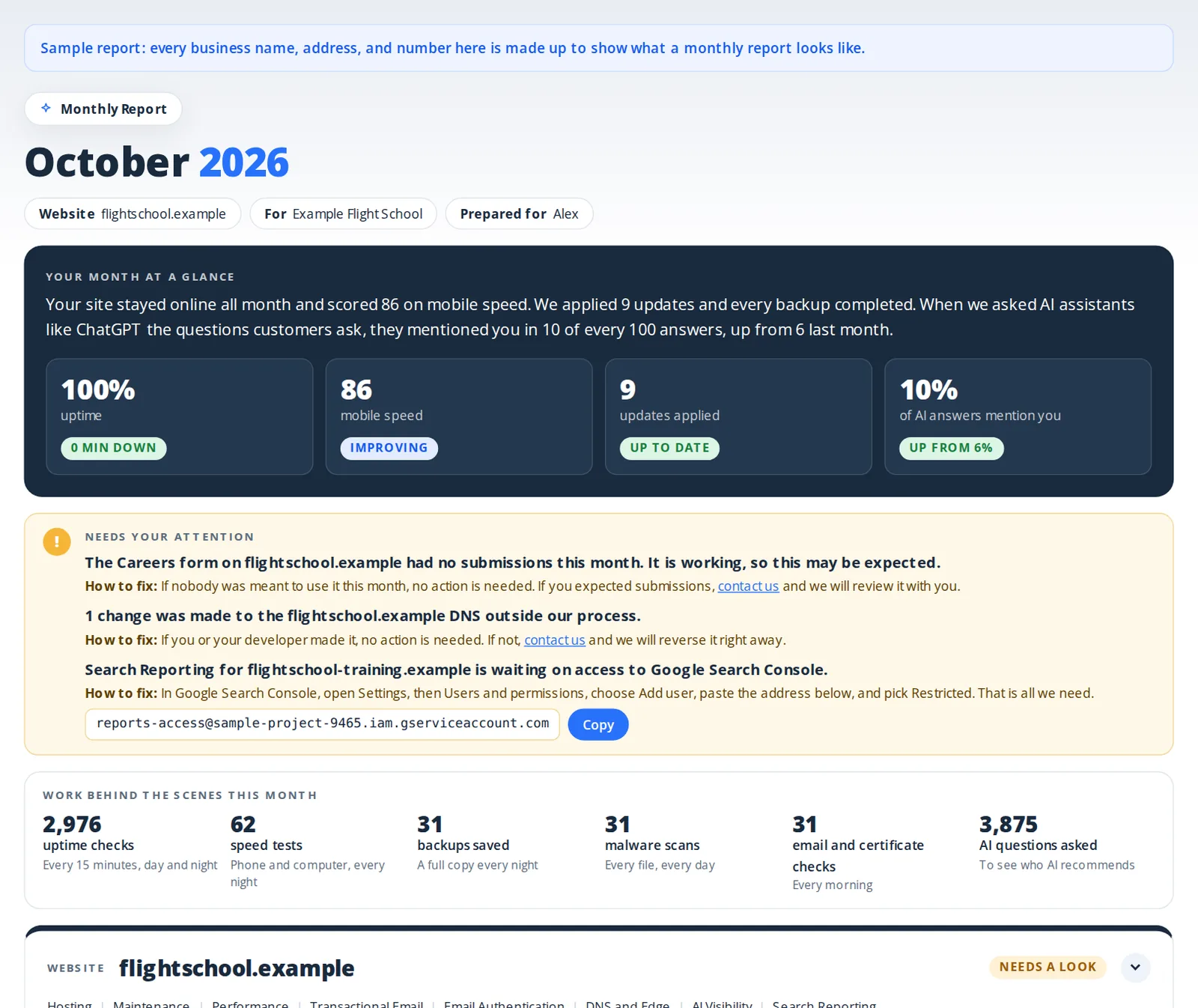
Once a month you get one report showing what happened with uptime, backups, updates, security scans, and speed, what we did about it, and anything we need from you.
Pricing
Managed WordPress Hosting
Included Every Month
What We Do for You
If You Go Over
| Storage | Above the included amount | $2.50 per GB a month |
|---|---|---|
| Bandwidth | Above 50 GB a month | $0.25 per GB |
| Processing power | Above a quarter of a processor | $0.25 per processor hour |
| Email sending | Above the included amount | $1.00 per 1,000 emails |
Usage above what is included is billed monthly in arrears.
Storage is your website's files and its database together, measured as the average for the month. Above the included amount, exactly the GB over is billed: 0.2 GB over is $0.50.
Bandwidth is what your website sends to its visitors in a month, cached pages and files included. Above 50 GB, exactly the GB over is billed: 10 GB over is $2.50.
Hosting includes a quarter of a processor for your website at all times, busy moments included. When it needs more, it gets more at once, and only the time above the quarter is billed: 10 processor hours over is $2.50.
Ask us
Weighing us against a named host? The comparisons take the main ones in turn.
Compare with WP Engine, Kinsta, Pressable, WPX, and MoreCompare with WP Engine, Kinsta, and MoreCompare with WP Engine and MoreStill have a question?
It is hosting where the provider does the server-level work instead of leaving it to you. The platform is tuned for WordPress, with caching, a firewall, DDoS protection, backups, and recovery all handled. You work on the site and its content, and the team behind the platform keeps the infrastructure fast, secure, and online.
Regular hosting is one generic stack meant to run anything, and tuning and securing it is your job. WordPress hosting is built around how WordPress behaves, so the stack, caching, and security are set up for it. Managed WordPress hosting goes further: the environment is also configured, backed up, and supported for you, so it is maintained instead of merely rented.
Cloudflare Enterprise with full-page caching across 300+ edge locations and a sub-100ms global response target, enterprise NVMe servers, an enterprise web application firewall, DDoS protection, edge bot management, and free auto-renewing SSL. Operationally you get free staging, daily backups kept 14 days, on-demand backups, free unlimited migrations, WordPress Multisite support, and managed support. None of these is sold as an add-on.
It is $25 per month per website. That includes 2 GB of storage, 50 GB of bandwidth, a quarter of a processor, and 2,000 emails a month. Above those amounts, storage (your files and database together) is $2.50 per GB a month, measured as the average for the month, bandwidth is $0.25 per GB, processing is $0.25 per processor hour, and email is $1 per 1,000. If you want hosting, maintenance, and performance together, WordPress Pro is $250 per website per month, with 5 GB of storage, 50 GB of bandwidth, a quarter of a processor, and 10,000 emails a month included, at the same overage rates.
Nothing stops and nothing slows down. Storage above what your plan includes is $2.50 per GB a month for exactly what is over, based on the monthly average, so a big upload you clear out soon after costs little or nothing. Bandwidth above 50 GB is $0.25 per GB. When your site needs more than its quarter of a processor, it gets more at once, and only the time above the quarter is billed, at $0.25 per processor hour. Email above the included amount is $1 per 1,000. Overages are listed on your next monthly invoice, and your monthly report shows where you stand.
Shared hosting puts many sites on the same resources, so a neighbor’s traffic spike or breach can drag yours down, and security and recovery are mostly left to you. Here every site sits behind Cloudflare Enterprise, which absorbs attacks and bad bots at the edge, while backups run automatically.
In layers. A Cloudflare Enterprise web application firewall blocks common WordPress exploits and injection attempts, DDoS protection absorbs attacks at the edge, bot management filters scrapers and vulnerability scanners, and every site gets free auto-renewing SSL. Malware scans, 2-factor authentication, and update work sit in managed WordPress maintenance, which is built to pair with hosting.
It is built for high traffic. Brief surges are absorbed across the global edge network, and edge rate limiting holds off abusive bursts. Because full-page caching serves most visitors straight from the edge, a viral post, a campaign, or a seasonal rush puts little load on your origin.
It suits them well. Capacity is there for sale-day rushes, the firewall and DDoS protection guard payment flows, and redundant infrastructure is built for high uptime. You can also take an on-demand backup before a risky change and restore it afterward if needed. For checkout speed itself, managed WordPress performance adds tuning on top.
Your entire site is backed up automatically every 24 hours, and each backup is kept for 14 days. You can start an on-demand backup yourself before a risky change. If a bad update or a compromised file gets through, you roll back to a recent clean copy or restore from your staging environment, and our team can handle the rollback for you.
Yes, and migrations are free and unlimited. We move your files and database, configure Cloudflare Enterprise, caching, and security, set up staging, and confirm everything works before switching the site live, so you do not have to guess at DNS. Tell us about your site through the contact form and we reply within two business days.
Form notifications and receipts are sent through a delivery service, not your web server, with DKIM and SPF set up on your domain. 2,000 messages a month are included, there is a delivery log in your portal, and bounces and failures are recorded. Nothing needs to be installed or configured.
Direct file access without opening a ticket: FTP, a built-in file manager, and one-click staging that you can push to production when ready. WordPress Multisite is supported for multi-site networks.
Hosting covers the platform: servers, the edge, the firewall, caching, backups, and support. Plugin, theme, and core updates, malware scans, and uptime and form monitoring belong to managed WordPress maintenance. WordPress Pro combines the two with performance in one plan.
Your monthly report goes out by email at 11 AM Pacific on the first Tuesday on or after the 3rd, and it covers the month just ended. The people on your account who receive reports get the email, and its link opens the full report online for 90 days.
We’d love to hear from you!