Managed DNS: The Records That Keep You Online, Changed Carefully and Watched Daily
DNS is the layer nobody thinks about until it breaks, and when it breaks it takes the website, the email, or both. We make the changes you ask for, keep a copy of the zone before touching anything, and check every morning that the records still say what we set them to.
A record change is made for you rather than left for you to make. A records, CNAMEs, MX, TXT, and SRV, the email records and the verification records for the services you use, all done by the people who already know your zone.
A Copy Before Every Change
A change is made, checked against what it was meant to do, and recorded. If it causes trouble, the copy taken beforehand goes back in seconds rather than being rebuilt from memory.
Checked Every Morning
Records get edited by registrars, by plugins, by a developer working quickly. The daily comparison is what turns that from a mystery outage into a message from us the next morning.
What you get
Everything Managed DNS Covers
All of these come with Managed DNS, set up and looked after by our team.
Changes
Record changes made for you
A records, CNAMEs, MX, TXT, and SRV
Email records set up correctly
Verification records for the services you use
Changes within two business days of asking
Safety
A copy of the whole zone before any change
Put back in seconds if something breaks
Nothing changed without a record of what it was
Proxy and TTL settings kept sensible
Nameservers confirmed against what they should be
Watching
Live records compared daily against what we set
Told when something changes outside our process
Records that disappear are caught the next morning
90 days of history, day by day
A ticket raised for our team when something moves
Accountability
Every change logged, with when it was made
Summarized in your monthly report
The history of what changed and when
Your zone stays yours
Nameserver guidance when you move a domain
Response and Fix Times
Urgent (site down or hacked): a response within 1 hour during business hours, fixed the same day
Normal requests: a response within 1 business day, fixed within 2 business days
DNS changes made within 2 business days
Every request timed, and reported each month against these times
Who did what: our team or automation, in your report
What Sets It Apart
Changes made within two business days
A copy before every change
Checked every morning
Cloudflare specialists, not a helpdesk
Every change checked before it goes live
Your zone stays yours
Want Your DNS Handled Properly?
Tell us which domain to look at and we will read your zone as it stands.
What a DNS Portal Shows You, and What It Leaves Out
A registrar portal gives you a record editor and leaves the rest to you. The useful part is further in: whether the records still say what you set, what moved while nobody was looking, and how fast you can put it back.
Registrar or DNS portalCascadia Managed DNS
What to compare
Registrar or DNS portal
Cascadia Managed DNS
Changes
You edit the records yourself
Record changes made for you, within two business days of asking
Safety
No copy of what the zone said before
A copy of the whole zone before any change, put back in seconds
Drift
Nothing watches the records after you save
Live records compared daily against what we set
Alerts
You find out when something breaks
Records that disappear are caught the next morning
History
Recent edits at best
90 days of history, day by day
Expertise
A general helpdesk
Cloudflare specialists, not a helpdesk
What Clients Say About Working with Cascadia
“I’ve always dreaded website management, but Cascadia has done an incredible job with my WordPress site, making it one less thing for me to worry about.”
Alex R.Cascadia client
“I’ve worked with Cascadia for several years now. They are always ready to help in any way I ask and can implement my ideas with ease. A company that values their clients!”
Liz D.Cascadia client
“Cascadia has been great to work with! We recently needed some updates, and Cascadia was quick to get them completed! We highly recommend Cascadia Web Services.”
Naomi T.Cascadia client
“Cascadia is very responsive and we’re happy with them as our primary IT vendor.”
Royle J.Cascadia client
“They do great work, been using for years. Prompt responses to requests.”
Records get changed by registrars, by plugins, and by a developer working quickly. We keep a copy of the zone before touching anything and compare the live records every morning, so a change nobody mentioned reaches you as a message from us rather than a mystery outage.
Businesses that cannot lose the site and the email at once
DNS is the layer nobody thinks about until it breaks, and when it breaks it takes the website, the email, or both. We make the changes you ask for, keep a copy of the zone first, and check every morning that the records still say what we set them to.
You can sell the outcome without hiring for it. We run the technical and content work under your brand, deliver reporting you can pass straight to a client, and stay out of the relationship.
We start by reading your zone as it stands: what points where, what is proxied, which records belong to services you still use and which are left over. You get that picture before anything changes.
Records are changed within two business days, and a copy of the whole zone is taken first. Risky changes, such as anything touching MX or nameservers, get explained before they happen rather than done quietly.
From then on it is simple. You ask for a change and we make it within two business days. Every morning the live records are compared with what we last set, and anything that moved becomes a ticket naming what it was before.
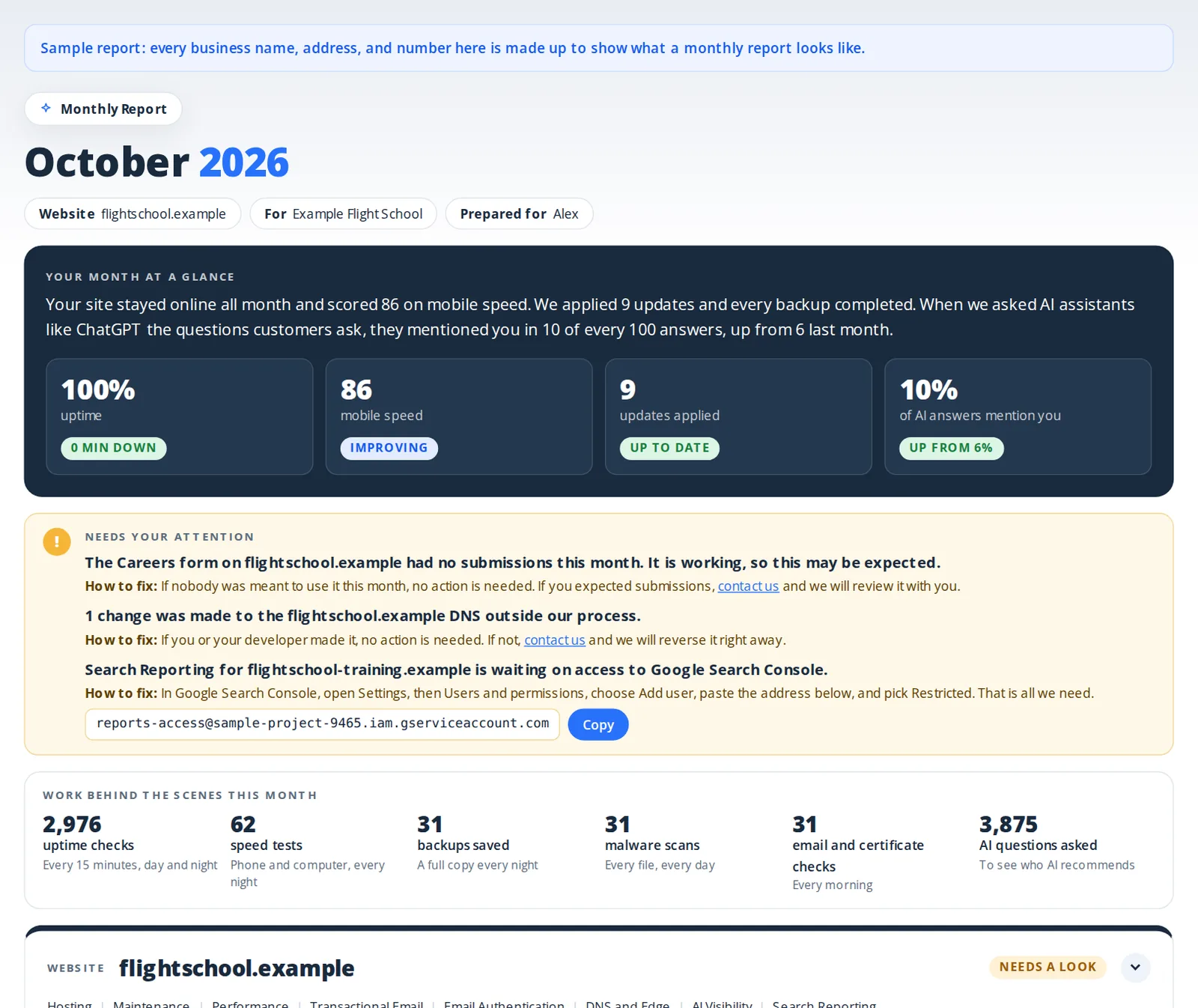
Once a month you get one report showing what happened with DNS changes, edge protection, and your domains and their expiry dates, what we did about it, and anything we need from you.
Delivered every month on the first Tuesday on or after the 3rd, at 11 AM Pacific, covering the month just ended
A private link by email to the full report online, which stays open for 90 days
Written in plain English with anything that needs you at the top and how to fix it
Every service in one report website by website, so everything you have with us is in one place
We make the DNS changes you ask for within two business days, and we take a copy of the whole zone before touching anything. Every morning the live records are compared against what we last set, and anything that moved becomes a message from us. Every change is logged, summarized in your monthly report, and reversible.
When does the monthly report arrive?
On the first Tuesday on or after the 3rd of each month, at 11 AM Pacific, covering the month just ended. It comes by email to the people on your account who receive reports, with a link to the full report online that stays open for 90 days.
Why pay for DNS when my registrar gives it away?
The records are free. Knowing that one of them changed at 2am is not. A registrar gives you a form; it does not take a snapshot before a change, does not check the records daily, and does not tell you when something disappears.
What happens if a change breaks something?
The copy taken beforehand goes back in seconds, rather than being rebuilt from memory. Every change is checked against what it was meant to do before it is called done, and nothing is changed without a record of what it was.
How quickly do you make changes?
Within two business days of asking. A copy of the whole zone is taken first, the change is checked against what it was meant to do, and what it was before is recorded.
Do I lose control of my own DNS?
No. The zone stays in your own Cloudflare account, and every change we make is logged, summarized in your monthly report, and reversible. You are asking us to do the work, not handing over ownership.
What do you need from me to start?
Access to your Cloudflare account, and a note of anything that must not be touched. That is all. Nothing is installed on your website, and no access to the site itself is needed.
My DNS is not on Cloudflare. Can you still help?
We will move it first, which we do regularly and without downtime when it is planned properly. Records are copied across and verified before the nameservers change, so nothing is guessed at.
What counts as a change I can ask for?
Anything in the zone: A records, CNAMEs, MX, TXT, SRV, verification records for a new service, a subdomain for a staging site. There is no per-change fee and no ticket allowance.
How does this differ from Edge Protection?
This service is about the records that point traffic at the right place. Edge Protection is about the settings that protect the traffic once it arrives: firewall, bots, caching, and SSL. Most sites want both, which is what Domain Pro is.
Will you tell me when something changes that I did not ask for?
Yes. The live records are compared every morning against what we last set, so a record edited by a registrar, a plugin, or somebody working quickly becomes a message from us the next morning, naming what moved and what it was.
How long do you keep the history?
Ninety days, day by day. You can see what a record said on any date in that window, when it changed, and what it changed to.
Does this work if my website is hosted elsewhere?
Yes. DNS and hosting are separate things. We manage the records whether the site sits with us, with another host, or on a platform like Shopify.
What is not included?
We do not register or renew domains under this service; that is Domain Management. We also do not manage mailboxes, though we will happily set up the records your mail provider needs.
Can I stop at any time?
Yes. It is monthly, and the zone is yours. If you leave, the records stay exactly where they are and access simply ends.
Cookies are small files your browser saves for a website, so the site can remember things between pages, like your choices here. We use only a few, and none for advertising.
How we use them:
Preferences and partner referrals: only if you accept.
Live chat and form protection: always on, so chat and our forms work either way.
You can change this any time. See our cookie policy.