On Page Navigation

Business Process Automation Services for Lead Routing Invoice Intake Ticket Triage

Our business process automation services map the work your team repeats every week, then build it to run on its own. Most of it happens inside Zoho, ERPNext, and WordPress, and we connect what sits outside them: accounting, email, telephony, e-signature, payments, anything with a usable API. Where a step needs real judgment, a model handles that one piece and everything around it stays predictable. Nothing a customer sees goes out until a person approves it.

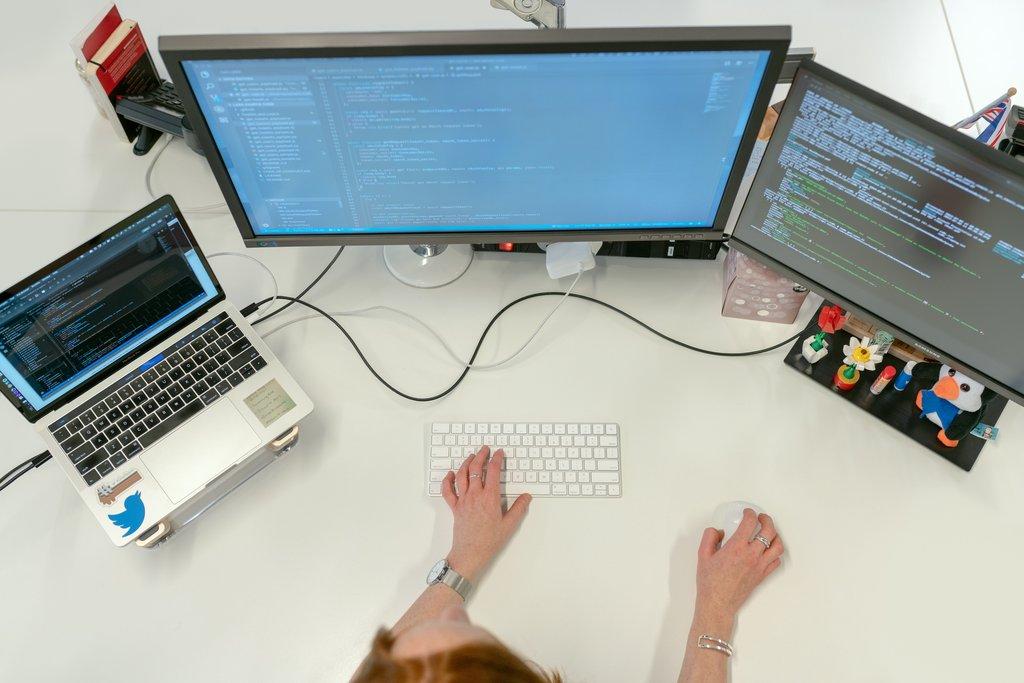
Cascadia engineer writing WordPress code across dual monitors.

Automation built to be trusted

What makes our workflow automation services different

Anyone can wire two apps together with a drag and drop tool. Keeping that connection alive for three years is the harder job. Because we already administer the systems involved, we build inside them rather than bolting on from outside, and every run gets logged. A person still stands in front of anything that reaches a customer. Restraint is the part most automation work skips.

Why teams hire an automation partner

A managed automation partner vs a DIY connector setup

A no code connector can get two apps talking this afternoon. What it will not do is handle the cases nobody thought of, or still be working when the platform shifts underneath it. The rows below set a typical self-serve setup against a partner who owns the outcome.

Process mapping vs guesswork

A DIY build automates the process somebody remembers, which is rarely the process that happens. We map the real workflow first, including the exceptions, then automate what the mapping shows. You keep the documentation either way.

Breaking changes caught early

When a platform ships an API change, a self-serve setup fails quietly until a customer complains. We monitor your workflows, so we already know which ones are affected and fix them before you notice anything is wrong.

Judgment steps done properly

Connector tools force every decision into rigid rules, so messy real world input breaks them. We add a model at exactly the step that needs to read something and decide, and leave the rest deterministic and testable.

One record, not four versions

Most businesses have the same customer spelled four ways across four systems. We reconcile records across your CRM, ERP, and site so there is one version left to work from.

Tested before it touches customers

A DIY workflow gets tested on live data because there is nowhere else to run it. We build in staging and run against test records first, so you watch it behave before anything reaches a real person.

Repairs included, not billed hourly

A contractor who built your automation is gone once the invoice clears. If something we built stops working, the repair is included at every tier, and nobody bills you while working out whose fault it was.

Built for teams doing it by hand

Who our automation services fit best

Automation pays off fastest where the same work happens over and over, or where two systems refuse to talk to each other. It pays again where consistency matters more than speed. If your team is copying data between screens, chasing the same follow up, or fixing the same mistake each month, there is usually a clear place to start.


How we work with you

How our automation design process works

Every engagement follows the same rhythm whether it is one workflow or twenty. We map what actually happens, build and test it somewhere safe, then watch it in production and adjust as your business changes. You approve the design before anything gets built, and you approve the behavior before anything goes live.

1

We map the process as it really works

We sit with the people who do the work and document the actual steps, including the exceptions everyone works around. The map usually makes the starting point obvious, and we say plainly which one it is. You keep the document whether or not you continue with us, and it tends to earn its keep on its own.

2

We build and test somewhere safe

The workflow gets built in a sandbox against test records, never on live data. We wire in the approval gates, the logging, and the rollback behavior, then walk you through it running. Nothing touches a real customer until you have watched it work and agreed it behaves the way you expected.

3

We monitor it and keep it alive

Once it is live we watch it. You hear from us when a run fails, when a platform ships a breaking change that affects you, and once a month with a plain summary of what ran and what we fixed. Repairs are included, and we adjust the workflow as your process changes.

Transparent pricing for business process automation services

Pricing

Automation Design

Essentials tier

$150.00
/per month
Monitoring and repairs included

DETAILS

A monthly subscription for teams whose automations are already built and mainly need watching. Includes monitoring, alerting, and unlimited repairs on anything we built, plus process mapping for two workflows when you start. There is no new build allocation, so it fits once the building is done and the job is keeping things alive.

Automation Design

Build tier

$450.00
/per month
1 new workflow per month

DETAILS

One new automation workflow designed, tested, and launched every month, on top of everything in Essentials. Covers up to forty active workflows, adds anomaly detection to the monitoring, and includes a quarterly process review. Response drops to one business day. Pick this one if you have a backlog and want to watch it shrink.

Automation Design

Scale tier

$1,200.00
/per month
3 new workflows per month

DETAILS

Three new automation workflows every month, and no cap on how many stay active once they are live. Adds cost monitoring across your AI steps, custom alerting, and a monthly working session to decide what gets built next. Response drops to four business hours. This is the tier for automating a whole function rather than a handful of tasks.

Automation Design

Partner tier

$2,500.00
/per month
8 new workflows per month

DETAILS

Eight new automation workflows every month, plus custom connectors for systems that do not offer a standard API. You get everything in Scale, plus an audit export for compliance review and a standing roadmap session. Response stays at four business hours with priority routing. For businesses where automation is infrastructure, not a project.

Testimonials

Here's what others had to say

Everything included

Complete business process automation coverage

Cascadia Web Services logo

Process Discovery Sessions

We sit down with your team and map how the work actually happens today, including the steps that repeat, stall, or get done differently by every person.
Cascadia Web Services logo

Workflow Mapping and Documentation

Every process we touch gets a written map covering triggers, steps, decision points, and owners. You keep that documentation whether or not you stay with us.
Cascadia Web Services logo

Automation Opportunity Scoring

Not every process should be automated. We rank candidates by volume, error cost, and complexity so build time goes where it actually pays back.
Cascadia Web Services logo

Systems and Data Audit

We review the fields, records, and permissions across your CRM, ERP, and site before building, so automations write to the right place from the first run.
Cascadia Web Services logo

Zoho Workflow Automation

Deluge scripts, Zoho Flow connections, blueprints, and custom functions built inside your own Zoho environment by a certified Zoho partner.
Cascadia Web Services logo

Frappe and ERPNext Automation

Server scripts, scheduled jobs, webhooks, and custom DocTypes that automate work inside ERPNext without breaking your upgrade path.
Cascadia Web Services logo

WordPress and WooCommerce Automation

Form submissions, orders, and customer records pushed into your business systems automatically, so nobody retypes the same information twice.
Cascadia Web Services logo

Third-Party API Integration

We connect the tools that sit outside Zoho and Frappe: accounting, email, telephony, e-signature, payments, and anything else with a usable API.
Cascadia Web Services logo

AI Decision Steps

Where a step genuinely needs judgment, we add a model to classify, extract, or draft. Everything around it stays deterministic and predictable.
Cascadia Web Services logo

Cross-System Record Sync

One customer, four systems, four spellings. We reconcile records across platforms so your teams stop arguing about which system is telling the truth.
Cascadia Web Services logo

Human Approval Gates

Anything customer-facing waits for a person to approve it. You decide which steps run on their own and which ones need a name attached.
Cascadia Web Services logo

Audit Trails and Logging

Every run is logged with its inputs, outputs, and decisions, so you can answer what happened and when without reconstructing it from memory.
Cascadia Web Services logo

Rollback and Safe Failure

Workflows are built to fail safely. Partial writes roll back, and a broken step raises an alert rather than quietly writing bad data for weeks.
Cascadia Web Services logo

Sandbox Testing Before Launch

New workflows run against test records first. Nothing touches live customer data until you have watched it behave the way you expected.
Cascadia Web Services logo

Continuous Workflow Monitoring

We watch your automations for failures, silent errors, and runs that simply stop firing, so you hear about a problem from us and not from a customer.
Cascadia Web Services logo

Platform Change Compatibility

When Zoho, Frappe, or WordPress ship a breaking change, we already know which of your workflows are affected and we get to them before you notice.
Cascadia Web Services logo

Break and Fix Support

If something we built stops working, repairing it is included at every tier. No ticket counting, no hourly billing, no argument about whose fault it was.
Cascadia Web Services logo

Ongoing Iteration

Processes change. We adjust triggers, conditions, and steps as your business moves, instead of leaving you with a workflow designed for last year.
Cascadia Web Services logo

Monthly Automation Summary

A plain-language report covering what ran, what failed, what we repaired, and where the next hour of build time would do the most good.
Cascadia Web Services logo

Volume and Time Reporting

See how many runs each workflow handled and roughly how much manual work it replaced, so you can judge the return for yourself.
Cascadia Web Services logo

AI Usage and Cost Visibility

Model usage is tracked per workflow against your own API keys, so you always know what the AI steps cost you and which workflow is driving the bill.

Answers to common automation questions

Frequently asked questions
What is an automation workflow?
It is a set of steps that runs on its own when something happens. A form gets submitted, an invoice arrives, a deal changes stage, and the follow-up work happens without anyone touching it. Most of a workflow is ordinary logic. Where a step needs judgment, such as reading a message and deciding what it is about, we add an AI model to handle that one part.
Do I need to be on Zoho or Frappe to use this?
No. Zoho and ERPNext are where we are deepest, since we are a partner in both and already run those systems for clients every day. But automation design covers whatever your business actually uses. If a tool has a usable API, we can generally build against it. Tell us your stack during discovery and we will be straight with you about what is practical and what is not.
What happens if an automation breaks?
We find out before you do. Every workflow we build is monitored for failures, silent errors, and runs that quietly stop firing. When something breaks, repairing it is included at every tier, with no ticket counting and no hourly billing. Workflows are also built to fail safely, so a broken step raises an alert instead of writing bad data into your systems for weeks.
Who owns the automations you build?
You do. Everything is built inside your own Zoho, Frappe, or WordPress environment using your accounts and your credentials. The process maps and documentation are yours to keep as well. If you leave, the automations stay behind and keep running. What you give up is the monitoring and the included repairs, not the work itself.
Do you use AI for every step?
No, and that is deliberate. Most of a reliable workflow is ordinary logic that behaves the same way every time. We use a model only where a step needs judgment, such as classifying a message, pulling data out of an unstructured document, or drafting a reply for review. Using AI where plain logic would do makes a workflow slower, more expensive, and harder to trust.
Do I need my own AI provider account?
Yes, and we recommend it strongly. You hold your own OpenAI, Anthropic, or Zoho AI keys. That means you see exactly what the AI steps cost, you keep control of your own data, and you are never locked to us for access. We track usage per workflow and report it, so you can tell which automation is driving the bill.
How long does a workflow take to build?
Most take one to two weeks from mapping to launch, and simple ones move faster. The build is rarely the slow part. Agreeing on what the process should actually do, and getting access to the systems involved, usually takes longer than writing the automation. Every workflow runs against test records before it touches live customer data.
What about automations we already have?
Those fall under Automation Maintenance, a separate service covering Zoho and Frappe workflows built by someone else. Inherited code carries different risk, so it starts with a paid evaluation that grades each automation as supportable, supportable after remediation, or needing a rewrite. Anything in that last group is quoted separately rather than absorbed into a monthly plan.
Can automations email my customers directly?
Only if you decide they should. By default, anything customer-facing waits for a person to approve it before it sends. You choose which steps run unattended and which ones need a name attached. An automation that sends a customer the wrong figure does more damage than one that waits an hour for a human to glance at it.
How do you stop an automation from doing something wrong?
Four ways. Approval gates on anything customer-facing. Sandbox testing against test records before launch. Rollback, so a partial failure does not leave your data half updated. And audit logging of every run with its inputs and decisions. We also tell you when a process should not be automated at all, because the cost of a mistake outweighs the time saved.
What counts as one workflow?
One trigger and the chain of steps that follows it. A form submission that creates a CRM record, notifies a rep, and schedules a follow-up is one workflow, not three. If a process branches into genuinely separate outcomes with their own logic and their own failure modes, we will tell you before it counts as a second one.
Can I change plans later?
Yes, in both directions, and moving down is normal. Many clients start on a higher tier to get their automations built, then drop to Essentials once the work is done and they mainly need it watched and repaired. That path is expected rather than penalised. Changes take effect on your next billing cycle.
What is not included?
Model fine-tuning, custom machine learning, and work involving regulated data such as HIPAA-covered records. We also do not build fully autonomous agents that take irreversible actions with no human in the loop. Automations built by someone else are covered by Automation Maintenance instead. Anything outside scope gets quoted separately rather than quietly added to your bill.
How do you access our systems?
Through accounts you create and control, scoped to what the work needs and nothing more. For clients whose Zoho, ERPNext, or WordPress we already manage, that access is usually in place already. You can revoke it at any time, and every change we make is logged against the account that made it.
What happens if we cancel?
Your automations keep running. They live in your systems under your accounts, and cancelling does not switch anything off. What stops is the monitoring, the compatibility work when a platform ships a breaking change, and the included repairs. Most workflows run fine unattended until something upstream shifts, which is precisely what the retainer exists to catch.
​Contact

Ask Us Anything

We’d love to hear from you!